Author Archives: peterdines

Introducing the Reaktor Sampler Pack

Note: from now on buying Loupe on this page automatically gets you a copy of the new Loupe 2 as well!Ā 

I’m pleased to release three new granular sampling instruments for Reaktor: Frame 2, Loupe and Mirage.

Each one has its own character and purpose. Frame 2 is a simple looping sampler designed for live control of loop points and other parameters. Here’s the cheat sheet:

Frame is free and you can download it here. This is an update to the original Frame – it adds a nicer GUI, clearer graphical start and end points on the waveform, and some small under the hood enhancements. Here’s a bit of improv to hear how it sounds:

The next instrument is Loupe – a polyphonic looping slicer for quickly mapping arbitrary (that is, non-beatsliced) sections of a sample to different MIDI keys.(note: purchasing this version now gets you Loupe 2 as well)

How it works: hit a MIDI key and hold, then click and drag to set loop location and length in one gesture, then click and drag in the XY controllers to set pitch, pan, gain, envelope, reverse / forward and filter parameters. Each slice / note has its own settings. It’s great for remixing. By default it has four voices but set more in the instrument properties if you want ’em.

It’s primarily intended for mangling melodic samples but percussion works too. Here’s what it sounds like:

Like Frame 2, Loupe is self documenting through extensive tool-tips. None of the controls are too small or too fiddly. You can learn how to use it in minutes but I think you’ll find a million uses for it. This reflects my instrument building philosophy that an instrument should give you musical leverage without making you feel like you’re endlessly flipping switches on a room-sized computer from the 1960s.

I use a Maschine MIDI controller and like to map each row of four pads to musically related slices so I can play a particular idea or phrase on different rows. A different pad (or MIDI key) can have the same slice but with a different length, or a different pitch, or reversed and panned differently, or all of the above.

Loupe can be downloaded here. A password to unlock the archive is $20 USD and can be purchased here:

Loupe Add to Cart

The third weapon in the sampling pack arsenal is Mirage.

Mirage is a granular sampler inspired by three things – the music of Tim Hecker, my laziness, and my disorganization. šŸ˜‰ It’s sort of like a trapper keeper for ambient sampling. It lets you select an area of a sample to work with, then allows you to set your granular parameters, per-voice filter settings and pan, voice retrigger frequency, and other things – and crucially, it remembers the pitches you play and saves them with a snapshot when using the “Hold” button.

This creates a host-independent sketchbook for sound design and composition. When you stumble upon a magic combination of samples, settings and notes, everything saves together in the instrument for later recall, refinement and mixing.

When you DO find something magical, you’ll find you can just sit there and listen to a snap for an indecent amount of time as the separate voices crawl across the waveform hypnotically.

Here’s what it sounds like:

Mirage is aimed at a different musical goal than Loupe – you might say that if Loupe is a paintbrush for cubism then Mirage is one for impressionism. Both instruments differ, then, from the typical granular sampling feel and sound which in my mind is more like pointillism.

Mirage can be downloaded here – A password to unlock the archive is $15 USD and can be purchased here:

Mirage Add to Cart

If you want to know more leave a question in the comments or hit me up on twitter.

Special thanks to Felix Petrescu for beta testing Loupe and helping to make it a better instrument!

NOTE: these ensembles are built for the latest full version of Reaktor – version 5.5.1 – it’s a free update if you have 5.15.

Several newbies have asked me about adding samples. See here and the resource page.

Improved Reaktor voice panning and a little digital archaeology

I was reading through the Reaktor application manual which is greatly improved in recent times, and came across this structure to pan voices in the stereo field:

Not bad, but you’ll notice the first voice isn’t panned to zero (hard left). Here’s how to make the spread go from zero to one:

And here is a download of a simple synth which uses the pan macro with four voices.

I happened to notice the Reaktor tutorial synth I’ve used in my example is thirteen years old! That goes back to the days when it was called Generator.

More on routing Reaktor in Live: multi out audio UPDATE: VST works too, not just AU

Reaktor has flexible audio out ports – you’re not limited to stereo, and you can take advantage of that in Live.

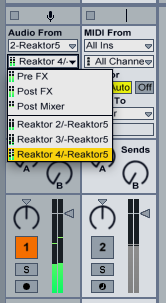
Fire up Live and load the Reaktor AU (UPDATE: VST version will work too). Load the Aerobic ensemble, and in the lower right corner, turn on the “out” switch. This will enable multi-out for Aerobic, so each drum unit can be routed to one of four stereo pairs.

Then go to an audio track, select audio from your Reaktor track, and select either the pre or post FX for the first stereo pair, or one of the three others.

This means you can apply effects to each stereo pair by routing them to different tracks.

But what if you don’t want to use Reaktor’s outputs in pairs? Let’s say you’ve built a crazy custom ensemble with a mono sampler, a sine, a square and a saw wave, and you want to route them individually to the first four outputs. What you can do then, is use Live’s mono track insert effect to choose either the right or left channel exclusively.

So there ya go – easy flexible routing. I’m not sure why it won’t work with the VST version of the plugin, and I’m too bushed to fire up Windows and find out if it works properly there. Are there any Windows users who’ve tried this?

UPDATE: turns out routing with the VST plugin version does work properly after all. I think I had the monitor setting wrong in the receive track. Sorry for the disinformation! Remember to turn off the track activator for the track holding Reaktor, and if you want the first stereo pair, choose pre or post FX in your target track, not post mixer (that would be the muted signal).

Routing Reaktor MIDI in Ableton Live with a dummy track

I’ve always been annoyed with the way Live disappears the MIDI out menu of a track the instant you drop in an audio effect or instrument. It makes it difficult to route Reaktor’s awesome Spiral instrument, for example, to another instrument track. Or to send LFO controllers from Reaktor to an instrument. You can do it by selecting the Reaktor track as the MIDI in on the destination, but then you lose the ability to also control the instrument from a keyboard or control surface.

Farting around this evening I noticed that you can kludge around this limitation by creating a dummy MIDI track as a MIDI bus:


Notice that the MIDI Bus track has its inputs set to the Reaktor5 track, but also to the Reaktor5 instrument in that track. The MIDI Bus track has its output set to the next track, which has an instrument rack. That doesn’t tie up the MIDI from dropdown in the instrument rack’s track, so the track still accepts note and control information from a control surface or keyboard, or what have you.

The other important point is to set monitor to “In” for your two target tracks.

Maybe this is a well known workaround now but a year or two ago when I googled for solutions I found only complaints and no fixes. I hope this helps somebody else because it sure opens up possibilities for me!

The Tunnel Sample Pack

I recorded a bunch of samples in a stone tunnel on Mt. Royal here in Montreal a while back – stomps, tin cans, bottles, plastic containers, sticks and stones and etc. clanking and knocking around. Here are some of them cut up into individual hits for your percussioneering pleasure.

And here’s a beat I made with them, loaded into a new version of ParamDrum.

The new version will be available this week as soon as I make a few more demo presets. Notable additions are: a sub bass control to add some extra oomph to your bass samples, and decay and sample-start controls.

UPDATE: daaaamn, I have to stop working in headphones. The bass ain’t what I thought. I have to redo this with a better kick that kicks.