Author Archives: peterdines

ParamDrum Update: now with Jonathan Style skin, new sample maps!

The impossible has happened: a ParamDrum update.

It’s got a brilliant skin courtesy of Jonathan Style, a new sound set based on samples from a very popular hardware synth (can you name it?), and at the moment only four new snaps. I could delay release and make more presets, but I want to get this out as soon as possible considering what a wait it’s been since the last update. It sounds like this:

This is a free update for people who’ve already purchased – the same password will unlock this skinned version. Be aware that I’ve migrated to the fantastic and problem free Reaktor 5.5 beta, and the new skinned version will no longer open in earlier versions. Get the beta here.

UPDATE: Due to popular demand I have posted a version of the new skinned ParamDrum that will open in the non-beta version of Reaktor.

The 5.5 beta is rock solid stable and if anything uses less CPU than previous versions. I have had no hiccups or crashes using it. Nevertheless, back up your custom ens before saving them in the new version, just in case you want to revert to 5.15. Like this version of ParamDrum, the Reaktor 5.5 update will be free for current license holders.

Haven’t purchased yet? $15.00 gets you the password to all versions.

Here’s the link:

ParamDrum Add to Cart

Sending MIDI CC with the Channel Message module


I’ve been working with someone on creating custom MIDI controllers for use in Ableton and thought I’d share ideas. The most flexible way to send MIDI in Reaktor 5 is to use the Channel Message module.

The input ports, from bottom to top, work like so:

  • Val: self explanatory. This is where you send the value of the message you want to transmit. By default the range is zero to one, but you can change this in the module properties.
  • Nr: In this case, the number of the MIDI CC to transmit.
  • Ch: The MIDI channel to transmit on. This overrides the settings of the instrument containing the module, but you can go into the module properties and tell it “always use instrument’s send channel”.
  • St: Status – this determines what kind of message will be sent. We’re sending type 3 which is a MIDI controller message. You can also send note on/off information, pitch bend, and so forth.

The tricky bit: this module only sends data when it receives events at the St input. When it receives an event there, it transmits whatever values are at its other inputs. That’s why I’m using the order and value modules, to ensure that every control change is followed by an event with the value “3” at St. Hover over St and the other ports for hints on what values they accept and what the values mean.

I’ve deliberately kept the structure as simple as possible for clarity… some enhancements you might make are to add panel controls to set the MIDI channel and CC#, and to rig up a more interesting event source than a knob. How about the LFO module? Try it but keep in mind the default range of the LFO is -1 to +1, not 0 to 1. You can either compensate with a few math modules or (not recommended) change the default range in the Channel Message module’s properties.

Here’s the test ensemble – build something fun with it!

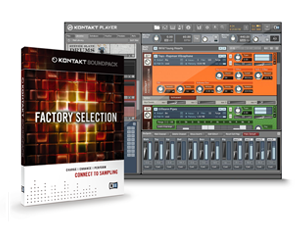
Kontakt factory selection

Hosted by imgur.com

Even if you’re not a Kontakt owner, you can still make use of a nice buffet of samples and instruments drawn from the Kontakt library by using the free Kontakt player and downloading the Factory Selection:

BAND
13 instruments are taken from this collection, which contains all standard band instruments found in genres like rock, jazz, funk, pop, r’n’b and hip-hop, covering e-guitars, basses, acoustic drum-kits, a drawbar organ and various e-pianos and more.

WORLD
Six world instruments are culled from the World Collection, which contains many exotic instruments from all over the globe, including flutes and reed instruments, bagpipes, plucked instruments and percussions.

SYNTH
12 instruments are included from this category, putting a wide range of contemporary synth pads, basses, leads and drum kits at your disposal.

VINTAGE
13 instruments are courtesy of the Vintage Collection, which handles the legendary sounds of analog synthesizers and keyboards.

URBAN BEATS
Five instruments from the Urban Beats collection complete the free KONTAKT FACTORY SELECTION. Urban Beats contains ready-for-action drum loop production kits, consisting of drum loops, single loop tracks (snare, hi-hat loop etc. separated) and the individual slices.

Now here’s the bummer: the instruments can only be used in the free Kontakt 3.5 player, because the samples are in a proprietary format and not WAV or AIFF. However, you can still get some Reaktor flavored sample bending by running it through Reaktor as an effect and using something like my grain delay.

A primitive beat-repeat

Here’s a little something I’m working on as part of a larger project. I tossed a little beat delay effect in here, an fx unit I’ve had lying around for a while. It’s extremely simple and makes no effort to smooth out the rough edges and clicks, but I like it anyways.

You want to map some midi keys to it and play it live, is how it works. Uses almost no CPU, and has an extremely simple structure, ripe for exploitation.

Download the Live Beat Delay here. There’s no password on the Beat Delay file.

ParamDrum TR Edition now available

The main idea behind ParamDrum is to have a fun and fast way of not only prototyping beats, but of creating variations that can be saved and recalled either in live performance or recorded and arranged into the backbone of a track.

ParamDrum TR Edition from Peter Dines on Vimeo.

Changes in this edition:

  • it’s red. Wow, is it red. Say, did you notice that it’s red?
  • new core-based probability macro (I’ve been meaning to clean that thing up for a while)
  • new morphable sample sets. Morphable? Yes – they’re grouped into sets of ten to twenty samples that gradually fade between two sounds, perfect for using with the sample select automation recorder.
  • new snapshots
  • saturator macro on panel B to add some boules
  • pan controls for middle and top samplers
  • it’s red.

It’s available here. The password is the same as for the other files.

You can also download a PDF that explains the MIDI controller mappings and other details. (note: PDF is not password protected)

Don’t have a password yet? It’s a measly old $15.00, a bargain, a steal. New to ParamDrum and Reaktor instruments? Keep in mind that this instrument requires you to have the full version of NI Reaktor.

You must enter a valid email address so I can send you a password for the file.

Paramdrum Add to Cart

Update: Here is the previous version of the instrument, using some of the default samples that ship with Reaktor (from the Massive ensemble, actually)

Reaktor drum machine with parameter locks from Peter Dines on Vimeo.

Earlier version available here.