Tag Archives: reaktor

Building a Simple Sampler in Reaktor


Building a Simple Sampler in Reaktor from Peter Dines on Vimeo.

In this video I walk you through creating a simple multipurpose sampler in Reaktor. I introduce you to basic Reaktor concepts like control and audio signal flow, polyphony, sample import and mapping, signal modulation with an envelope and adding factory effects. This is an introductory level video but it covers a lot of important territory you need to know to build more advanced structures.

Look forward to more videos from me – the next one will be on creating a sequenced beat production center from scratch.

Source of Uncertainty

It’s funny how ideas travel and transform. David Lilja shared a Nord Modular G2 patch here which was based on a Buchla module, then asked me what it’d look like in Reaktor. Having no real experience with either the Buchla or the Nord – ok, I did fiddle with the software Nord demo at one point – I looked at his screen capture and translated it into Reaktor structure. It’s probably not a close emulation of either, but it’s useful and works, and I’ll take practical over authentic any day. 😉

Here’s what the innards look like:

As you can see, it uses an audio rate slew limiter towards the end, so I’ve added an audio to event module to give it both event and audio outputs. It produces some interesting semi random events – neither completely random nor predictable, which I think is what we’re aiming for here. Could be fun to modulate the delay time of a tape delay emulation with it, or something as humble as filter frequency.

Here is a link to the download.

If you do something neat with it, let me know!

Chroma Update 1.0.3

Here is version 1.03 of the Chroma and Gris Gris sequencer and synth, which adds a few features and fixes a couple of minor bugs. The Gris-Gris synth now has two additional filter types, bandpass and high pass, and a ring mod control for metallic and bell tones. It comes with a much expanded and refined Lemur template that allows full editing of sequences.

To celebrate the release of this new version, the Chroma and Gris-Gris sequenced synth ensemble is temporarily reduced in price from $24.99 to $19.99

Chroma can be purchased and downloaded right now. Remember, Chroma is a Reaktor ensemble and requires a full installation of Reaktor 5.8.0, not just Reaktor player.

Buy Chroma and Gris-Gris Now Add to Cart

A link will be emailed to you immediately upon completion of payment.


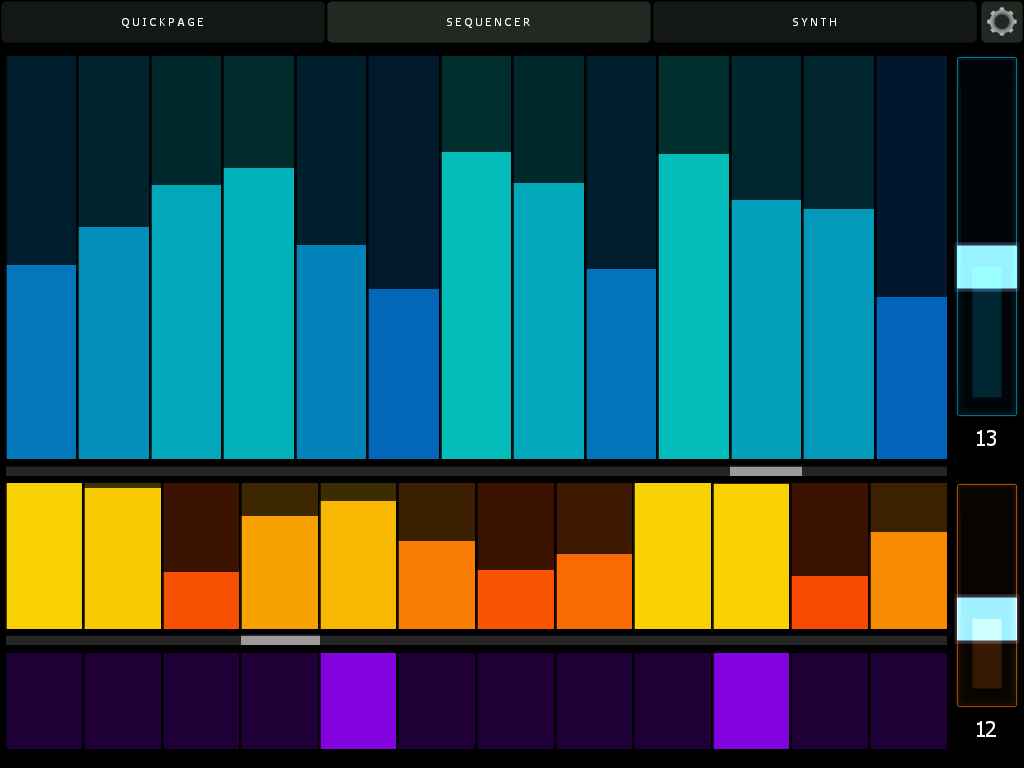
I’ve also added further support for Lemur. The new template has three pages – the original quickpage, plus a sequence edit page and a full synth edit page that offers control of every parameter in the Gris-Gris synth. The quickpage now has controls for sequence speed, key and scale type.

Here’s the sequencer page. Swipe a finger across to set pitch and velocity, or use multiple fingers to adjust many values at once. If you enable bidirectional control, all parameters in Lemur will update on snap change, including sequence lengths and values. Note the cursors – their position will move as Chroma plays, letting you know where you are in the sequence without having to keep your eyes on the computer screen.

Here’s the synth page. All Cgris-Gris parameters are editable and also update when you change snaps in Reaktor. The filter section features a drop down menu to select scale types.


Here’s the updated cheat sheet – new features on the GUI are highlighted in blue.

chromanotes 02

Now, about that bidirectional control – in order to have your Lemur controls update when you change Reaktor snapshots, simply create an OSC target called Lemur, and direct it to port 8000 and whatever the IP address of your iPad is on your local or ad hoc network. Here’s what my config looks like:

Pretty easy, actually. Make sure you use port 8000 for Lemur though – that is its standard port and cannot be changed. (I use port 10001 for Konkreet Performer and TouchOSC)

More info on Chroma and Gris Gris, including video, is here.

Collaborative Building on Google Plus

As you may know, I’ve been kicking ass and chewing bubblegum working on a collaborative Reaktor project on the G+ Reaktor group. Our first project is to create a metasequencer by having one Roux macro modulate another.

Since it’s early in the new year and people are sluggishly recovering from the holidays I’ve gone ahead and done the assigned homework and here is a cheat sheet.

That’s the front panel – “Meta” is our modulator, and it modulates the “Roux” macro. There’s an “active” button to turn the metasequencing on and off, and a Snap# numeric readout to let you know which snapshot you’re selecting with the mouse in the meta-sequencer.

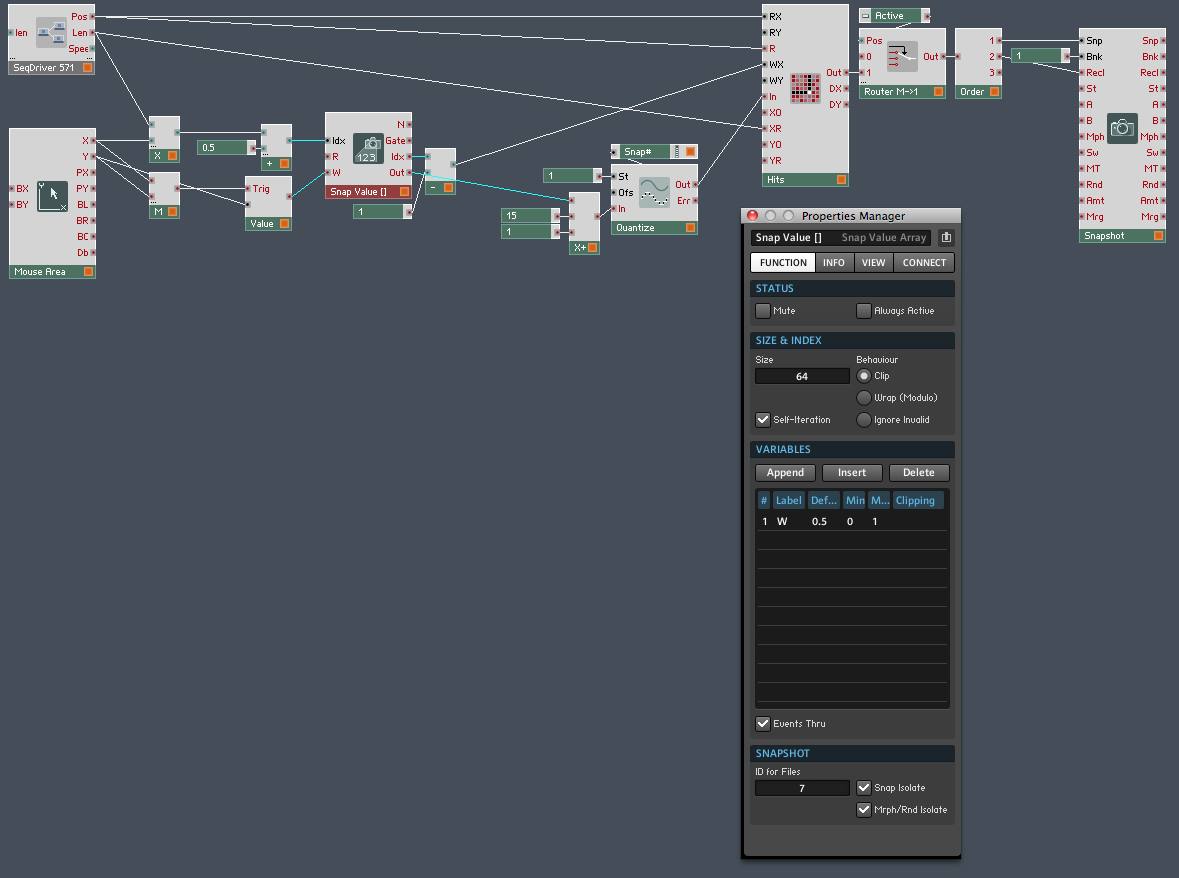
Which brings us to how Meta modulates Roux: it selects and recalls different snapshots. Here’s what it looks like inside:

As you can see, there’s some additional structure in this macro. Important note: the Snap Value [] array module, as you can see in its properties, is set to snap isolate and Morph/Rnd isolate. That’s because we don’t want it changing its own sequence as it recalls different snaps – we only want those events to select different sequences in the other Roux macro.

A couple of other things to note – the value coming out of the Snap Value [] module is scaled between 1 and 16 and quantized to integers. You can’t see it here but the event table has been modified to accept values between 1 and 16. This is perhaps not the optimal way to do this, as we have to change that max value of 16 in two places, but it’ll do for now. Why have a max value at all? It’s easier to select a value with the mouse that way. Again, there are other ways to do it, but later for that.

After the event table the values go through a router which is used to activate or deactivate the metasequencing, then into an order module which directs the values to the Snp and Recl input ports on a Snapshot module. This part should be self explanatory.

I could offer a download of the ensemble I built, but that defeats the purpose of collaborative building. I’d like anyone following along to build their own instrument / ensemble, come up with their own questions, and possibly their own ideas for improvement.

So get cracking!

Chroma and Gris-Gris: Sequenced Monster Monosynth

Ladies, Gentlemen, Exalted Bipeds, may I introduce to you my latest creation, the Chroma and Gris-Gris ensemble:

Chroma is a performance oriented monosequencer and VA carefully tuned for ergonomic ease of use and glitch free operation in standalone and plugin mode. Slur features in Chroma match up with legato and glide features in the Gris-Gris synth to create a slinky sinuous note articulation.

Sequences can be created and controlled via mouse, MIDI, Konkreet Performer, TouchOSC and Lemur. Since there is now full OSC support in the Reaktor plugin version, you can do everything with Chroma in your preferred DAW that you can do stand-alone. A dream come true!

Now, about those Konkreet Performer mappings:

TouchOSC and Lemur templates are included in the package but there’s something special about Konkreet Performer that sets things on fire when it’s paired with Chroma and Gris Gris, a certain magic in the way it morphs and distorts sound. It is my firmly held opinion that not nearly enough people use KP and if you want something really special and unusual on your iPad you should rush right over to  Konkreet Labs or head straight for the App Store and buy a license.

The Gris-Gris synth is easy to program, surprisingly versatile, screams like a bastard and can be played on its own with MIDI input. Check out the effects bank for some wild quasi-modular sounds. A dedicated filter LFO with a morphing shape control and chaos flux knob provide mutating automation. Flux controls are also provided for the mix and filter feedback sections. Want more sounds? Here ya go:

Chroma’s MIDI output can be used to trigger external synths as well, depending on the completeness of the synth’s MIDI implementation. Tested and fully working synths include NI Massive, NI Absynth, U-he Tyrell and Tal Noisemaker. Some synths may work perfectly for note sequences but not for slur and glide.

Here’s the full cheat sheet:chromanotes

Chroma is 24.99 USD temporarily reduced in price to $19.99 and can be purchased and downloaded immediately. Remember, Chroma is a Reaktor ensemble and requires a full installation of Reaktor 5.8.0, not just Reaktor player.

Buy Chroma and Gris-Gris Now Add to Cart