Tag Archives: reaktor

Poly Theremin, Exclusively for Konkreet Performer

Hey gang, did you notice that the Konkreet Performer half price sale is still in effect? Go get it right now. Even if you don’t have an iPad – you can get that later, it’s a good reason to get one. (edit: sale is long gone but the Performer software is still there and it… is… fantastic!)

As a little bonus for Konkreet users, I’ve reskinned and refreshed my theremin ensemble, with some features from the Chroma sequencer.

Here’s what it sounds like:

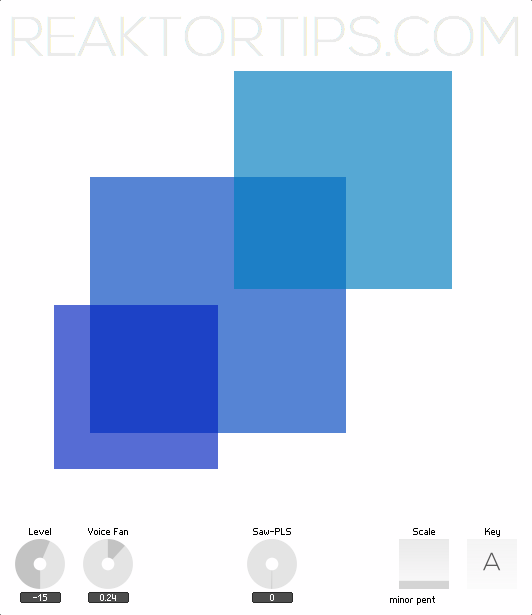
And here’s what it looks like:

Download here

The onscreen display is just a display – to make some noise, set up Konkreet Performer with three nodes and a ribbon. The three nodes control its three voices, and the ribbon controls beat-repeat and voice panorama.

It’s a lot of fun to play and if you’re ambitious, the structure within is a good introduction to mapping Konkreet parameters to Reaktor voices: node angle from the central node controls pitch, distance from the central node controls vibrato intensity and resonance, and touching and releasing the nodes gates the voices.

Enjoy!

A Working Clock

Recently I’ve been working on some new sequenced ensembles and found to my horror that the clock macro I’d been relying on no longer worked properly. Bit rot? Slow change in behavior from version to version? I’m not sure. The problem was the old zero reset bug – old hands at Reaktor are nodding sagely right now – where the first beat or note would not fire off after resetting the song position to zero.

So I went through some frantic experiments and experienced a genuine Dark Night of the Soul until I put something together based on my old clock macros, hints from forums, and ideas from the Reaktor user library.

Unfortunately in the process I upgraded to the current version of Reaktor, 5.7.1, because there seemed to be some subtle differences in behavior between 5.6.2 and 5.7.1 and there’s a limit to how much time and effort I can dedicate to old versions.

Here’s what the new, fixed, stable, working macro looks like on the inside:

As you can see it’s fairly simple. If you’re still sticking with 5.6.2 you should be able to throw one together from this schematic in a few minutes.

Special thanks to Owen Vallis who came up with the idea of using the mod output of the Modulo module to gate the Div output. So much better than using a silly old step filter. Owen posted his fix in this thread on the Reaktor forums so go thank him there.

I’ve stuck the macro in this demo ensemble:

Click here to download the new clock macro.

Grab the macro labeled “SeqDriver 571” and use it in your own creations. Of course, nobody’s perfect and no fix lasts forever so let me know if you find a bug, a sequencer where it doesn’t work or works erratically, or if you need help wiring it into your own creations.

The Science of Surfaces

Hey kids, there’s a new poll on the left. Please vote and select multiple options if you use multiple touch surface apps. 

UPDATE: the built in Blogger poll is broken and I’ve switched to a widget from pollcode.com. Apologies to anyone whose votes were lost… it kept resetting to different numbers of votes. (if this is actually someone messing with me through a Blogger security hole, well played sir, by which I mean, get a life šŸ˜‰


My experience of touch surfaces as controllers is that they shouldn’t be clones of what they’re controlling. I admit that there’s a certain cool factor in having a Lemur or TouchOSC template that allows full access to every parameter on a Reaktor instrument’s GUI. And in some cases, that can add to the playability and usability of the instrument.

On the other hand, though, what’s the point of replicating an instrument GUI? Generally speaking there will be too many controls, and they will be too functionally and ergonomically diverse to provide a fluid performance experience.

This is why I keep coming back to Konkreet Performer. It doesn’t attempt to provide the ability to mimic a GUI. What it does, and does well, is translate touch into control in ways that are both simple and complex, in the right ways – simple in that setting up a layout is easy and direct – and complex in that parameters can describe not just touches and movements, but the relationships between different touches and movements. Unexpectedly cool things ensue.

This is not to say that I don’t recognize the relative strengths of the other touch surface apps – maybe this is just a personal preference and I simply prefer a simple touch interface that functions as an adjunct to a standard computer setup, rather than a replacement for it.

In the long run I’m pretty sure tablets and laptops will glom together in some form – if the Microsoft Surface doesn’t succeed then something eventually will and every Reaktor ensemble or synth plugin will be its own touch surface – a situation which will bring its own set of problems and solutions.

Anyhow, please vote in the poll on the left because I’m getting ready to launch a new instrument and I’ll take into account the popularity of the apps when designing controller mappings and templates.

OSC support in Reaktor plugin mode, at last!

 Reaktor update news! In the upcoming 5.8, which is now in beta, we will finally have OSC in plugin mode. That means connecting an iPad to our favorite ensembles directly with no MIDI translation layer. Fire up Konkreet Performer and map OSC parameters directly with Reaktor running in Logic, Reaper, Cubase, Ableton Live, whatever. 

I’m excited. Are you excited? If not I’ll be excited for you.

New and improved features:

  • Updated OSC Settings window
  • Improved handling of OSC and MIDI, enables fast and easy mapping of MIDI & OSC controllers to Reaktor ensembles in Play Mode
  • New OSC Array modules, for sending and receiving OSC messages in array format
  • OSC in plug-in mode
  • OSC learn feature now also implemented in Play mode
  • OSC activity indicator
  • Limits on the total number of OSC connections have been removed
  • Maximum numbers of ports for the OSC Send and Receive modules has been increased to 40
  • Improved sample management, including the ability to manage samples when in Play Mode
  • Various workflow improvements in the sample map editor
  • Selection of sampler module per drop down menu
  • Show sampler module in structure functionality
  • Mouse control fine tuning
  • Bookmark behavior for Screensets
  • Fixed sample rate per Ensemble
  • Various other fixes and improvements
