Tag Archives: Sampler

Reaktor drum machine with parameter locks

Another peek at what’s cooking at ReaktorTips Sound Laboratories.

This is a granular drum sampler I’m working on in Reaktor that has Elektron MachineDrum style parameter locks. I think it sounds pretty good so far. Note the ridiculously low CPU usage – 2% to 2.1%

Reaktor drum machine with parameter locks from Peter Dines on Vimeo.

At the moment, the knobs are used to write looping parameter automation per step, and this works great with Kore 2 hardware controllers, but entering percussion sequences must be done with the mouse. I’ve tried using a keyboard to enter data but it’s hard and fiddly to get the exact velocity you want on a given step, and a pain to remove steps.

I’m going to wait till my Maschine arrives and use its drum pads to trigger sequence entry. The sequencer doesn’t send MIDI yet, but the controller does and from everything I’ve heard it’s a joy to use.

Sorry to keep teasing you guys with this stuff but no downloads – I’m trying to think of a way to monetize this, either with a small payment for the ensemble plus documentation, or maybe something sponsored. And yet at the same time, I want to share. Ah, conflict.

Granular Sampler Download – Very Simple Grainer 02

Didn’t I say I’d have the next installment in this series ready “next week” a year ago? Dang.

Very Simple Grainer 02 from Peter Dines on Vimeo.

Here’s a new and improved version of the Very Simple Grainer, with some new features, fixes and a couple of new samples. I’ve moved controls around, added the very nice sounding Core saturator that comes with Reaktor 5, added LFOs to the grain size and speed parameters, and fine tuned a couple of other things. If you’ve been following the material I’ve posted here and at Noisepages, you should be able to puzzle it out. If you have questions or feature requests, post a comment.

Download Here

The first iteration, with instructional PDF, is here.

Update: you’ll want to add your own samples as I’ve only included two. Use this technique and set them all to a root key of zero.

Fast Sample Wrangling with Reaper, Edison and Reaktor

How do you deal with samples and MP3s that you want to use as raw material in Reaktor? Reaktor has an audio browser, but it doesn’t read compressed formats so they have to be converted beforehand. Then you’ll probably want to break them down into chunks so you don’t have to import a three minute song to get a ten second drum break or koto sample – so you have to fire up a separate audio editor and cut things up ahead of time.

FL Studio is one of my go-to programs for this, especially for dealing with large numbers of samples. It has a great sample browser sidebar which previews-on-select your compressed or uncompressed audio, and the integrated FL version of the Edison wave editor makes it a snap to grab a selected area of a sample and drag it into a sampler channel or the playlist. This works for just about any audio file, including compressed formats like Ogg and MP3.

This is handy for prototyping things and trying out ideas, but the built in sampler channels are limited and I’d rather be dragging things into Reaktor. So can you drag a sample or a piece of a sample from Edison into Reaktor running as a plugin in FL Studio? Of course not – that would be too easy.

The next step for me was to try the standalone Edison sound editor and see if it can drag selections into standalone Reaktor’s sample map. Nope, that didn’t work either.

Finally, I loaded up Reaktor in Reaper, selected a sample from Reaper‘s media explorer (it’s very similar to a Windows file explorer window), and opened it in Edison. Magically, dragging a selected area from Edison into Reaktor worked now! Reaper is voodoo, kids. I don’t question it too much, I just use it and be thankful.

Sample Drag and Drop with Edison, Reaper and Reaktor from Peter Dines on Vimeo.

The media explorer tab, like the browser in FL, works with compressed or uncompressed audio and can preview on select. And of course Edison can deal with compressed or uncompressed audio, so these two plus Reaktor make a super sampling triumvirate powerhouse. Jeez, I should be writing ad copy. Anyways, go grab ’em, because the demo versions of both programs are non expiring and will allow you to do what I’ve demonstrated here.

Reaper

Edison

Pro tip: sample maps

Often, I want to have a whole bunch of samples with the same root key but on different notes in the map; for example, in a drum machine, where you have separate sample select and pitch controls. I like to have my root key at zero so I can add or subtract semitones with a knob to pitch things up or down.

One way to prepare a map for this is to laboriously add one sample at a time and set the root key manually. Blech! That’s no fun.

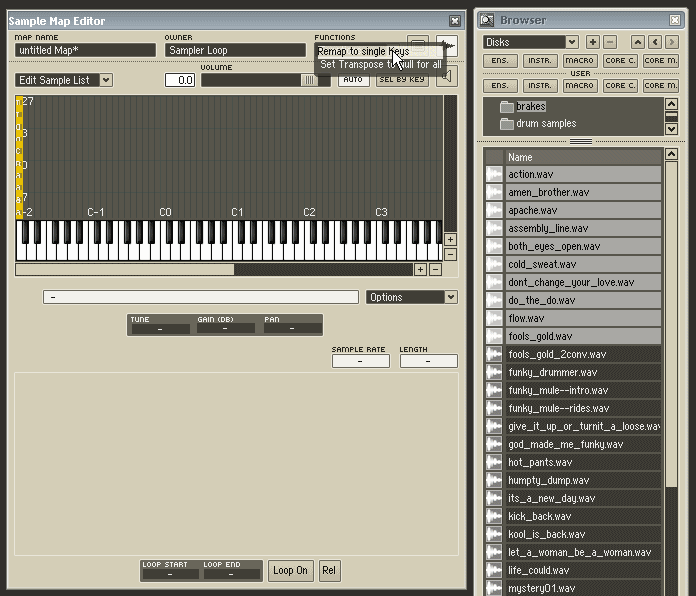
A better way is to use Reaktor’s internal browser to navigate to your sample directory and select a bunch of samples, like so:

Then – and this is the important part – drag them onto your target root key so they all stack up together like so:

Then from the functions menu choose “remap to single keys”:

…after which you will have all your ducks in a row.

Go to the sample list view to verify that they all have the same root note.

Now, wasn’t that easy? Of course you can also drag them onto key C3 to have them pitched at middle C. It all depends how your sampler instrument likes to be fed and watered.