Tag Archives: tutorial

Collaborative Building on Google Plus

As you may know, I’ve been kicking ass and chewing bubblegum working on a collaborative Reaktor project on the G+ Reaktor group. Our first project is to create a metasequencer by having one Roux macro modulate another.

Since it’s early in the new year and people are sluggishly recovering from the holidays I’ve gone ahead and done the assigned homework and here is a cheat sheet.

That’s the front panel – “Meta” is our modulator, and it modulates the “Roux” macro. There’s an “active” button to turn the metasequencing on and off, and a Snap# numeric readout to let you know which snapshot you’re selecting with the mouse in the meta-sequencer.

Which brings us to how Meta modulates Roux: it selects and recalls different snapshots. Here’s what it looks like inside:
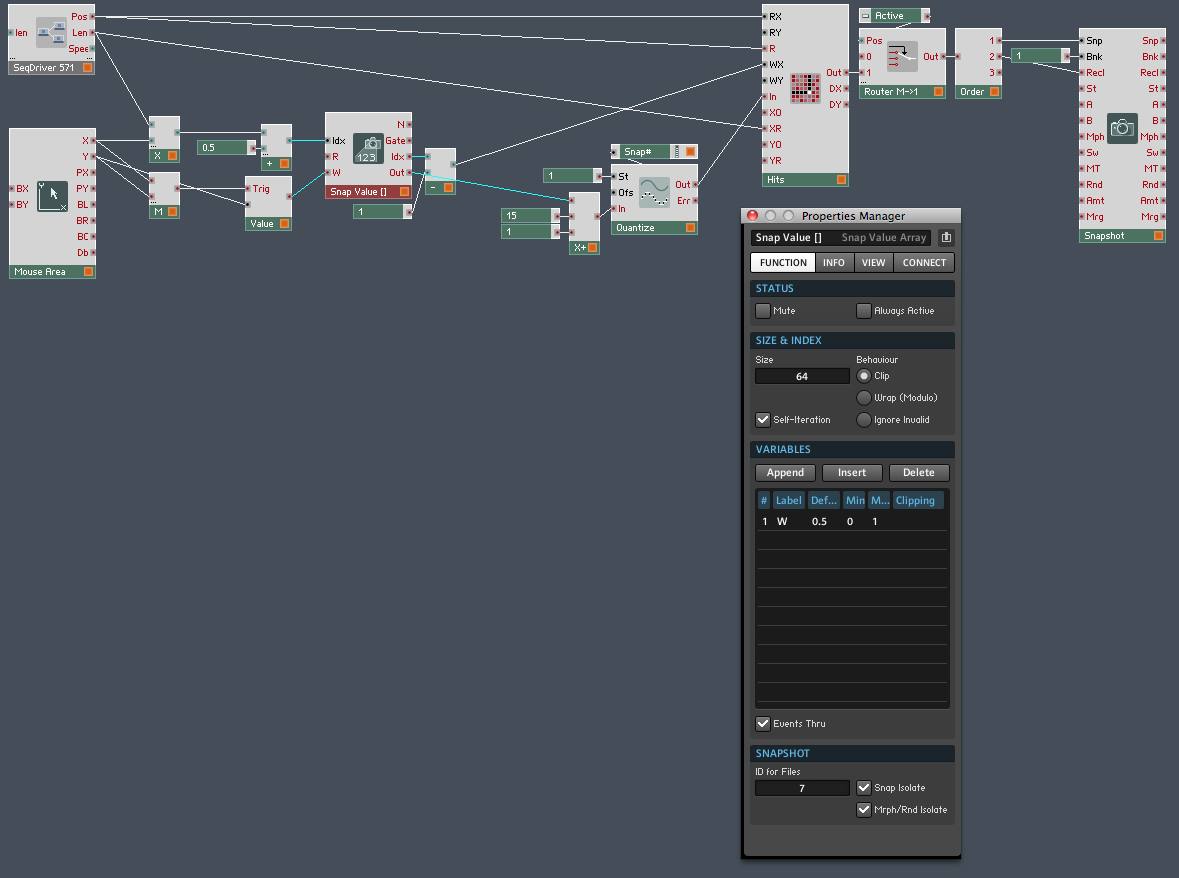
As you can see, there’s some additional structure in this macro. Important note: the Snap Value [] array module, as you can see in its properties, is set to snap isolate and Morph/Rnd isolate. That’s because we don’t want it changing its own sequence as it recalls different snaps – we only want those events to select different sequences in the other Roux macro.

A couple of other things to note – the value coming out of the Snap Value [] module is scaled between 1 and 16 and quantized to integers. You can’t see it here but the event table has been modified to accept values between 1 and 16. This is perhaps not the optimal way to do this, as we have to change that max value of 16 in two places, but it’ll do for now. Why have a max value at all? It’s easier to select a value with the mouse that way. Again, there are other ways to do it, but later for that.

After the event table the values go through a router which is used to activate or deactivate the metasequencing, then into an order module which directs the values to the Snp and Recl input ports on a Snapshot module. This part should be self explanatory.

I could offer a download of the ensemble I built, but that defeats the purpose of collaborative building. I’d like anyone following along to build their own instrument / ensemble, come up with their own questions, and possibly their own ideas for improvement.

So get cracking!

Algorithmic Music in Reaktor

It occurs to me that it’s been ages since I posted an actual, you know, Reaktor tutorial around these parts. Which is what this blog was originally created for! So here’s something nice and meaty: a tutorial on basic algorithmic music generation techniques in Reaktor.

What this tutorial and its associated instruments will do is give you a basic feel for how events in Reaktor can be wrangled and manipulated into musically meaningful forms. What it WON’T do is compose your next masterpiece or write a top ten hit:

However, what you might do is take some of these techniques and create instruments that go further towards realizing your musical ambitions. I’ve always thought of Reaktor as a tool that blurs the distinction between instrument and composition. If you think along the same lines then you will find this information useful. Happy building!

Download the tutorial here (PDF and instruments)

Mixin’ it up with Konkreet Performer

I was talking to another Reaktor builder about mixing Konkreet Performer signals, so one KP parameter could control 25% of the range of a Reaktor instrument parameter, another could control 10%, and so on. It was an intriguing idea so I worked out the math and knocked this quick test ensemble together.

All it does is mix the X-value signals from the first three nodes in Konkreet Performer, then normalize the range so it’s always 0 to 1. That way you don’t have to fish around making sure everything adds up to 100%. Here’s what the structure looks like:
The output goes to a numeric display so you can see the values. 
You could easily adapt this to control whatever parameter you desire, or send the result to MIDI, or even adapt it to mix incoming MIDI CCs instead of Konkreet OSC parameters. 
Here’s the ensemble. Happy building!

Modding Spacedrone for keyboard control

Any sound generator in Reaktor can be modified to give MIDI note control over the output level. Here’s how to do it in Spacedrone:

Easy peasy. An ADSR envelope multiplies the signal going to the output. You can also use a selective note gate module instead of a vanilla gate module so only one specific note will trigger output. Adjust the attack, decay, sustain and release to taste.

Download the modded ensemble here. (oops, link was broken, should work now)

If you’re looking for an interesting way to manipulate recorded samples of Spacedrone or other audio material, try my sampler pack.

UPDATE: added pitch control too. It doesn’t work the way a normal synth would because the pitches of individual voices have a random factor but you can control the range.

Improved Reaktor voice panning and a little digital archaeology

I was reading through the Reaktor application manual which is greatly improved in recent times, and came across this structure to pan voices in the stereo field:

Not bad, but you’ll notice the first voice isn’t panned to zero (hard left). Here’s how to make the spread go from zero to one:

And here is a download of a simple synth which uses the pan macro with four voices.

I happened to notice the Reaktor tutorial synth I’ve used in my example is thirteen years old! That goes back to the days when it was called Generator.