Tag Archives: tutorial

Sending Random Notes from Reaktor

Here’s a quick structure and mini tutorial that demonstrates how to send a random note from Reaktor on triggered input – you can use OSC or MIDI to map a control to the trigger button here:
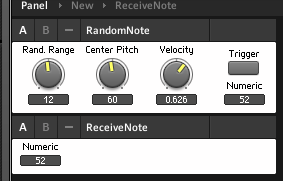
…and the RandomNote will then send a note to the ReceiveNote instrument – or, in the properties, you can set up RandomNote to send the note to a different instrument, or a different plugin, or even a hardware synth. Use the Connect tab of the RandomNote instrument properties to select a destination.

The center pitch and rand. range knobs control the range of notes that can be selected randomly.  The velocity knob sets the volume of the triggered note. This is not a finished instrument, but a demonstration of a technique. A recipe ingredient, if you will.

Here’s what it looks like inside:

The Trigger button triggers a core cell that outputs a random value between -1 and 1. This is multiplied by the Rand Range knob to produce a value, in this case between -12 and 12. A quantize module turns this into an integer, a whole number, which will correspond to a MIDI note. This value is then added (or subtracted if it’s negative) to the value from the Center Pitch knob. An Order module sends the note value first to the P(itch) input port on a Note module, and then to the Trig(ger) input on a Value module that holds the Velocity, or volume, of the triggered note. The Note module only sends when it receives a value at its G(ate) port, and it sends a note with whatever pitch was at its P input at the time.

Download the ensemble here and start hacking away at it. Replace the Rand. Range and Center Pitch controls with a scaled LFO, and the Trigger button with a clock, for example. Another recipe ingredient that might come in handy here is my Roux basic sequencer macro.

You’ll quickly notice, in sending this control signal to a synth, that it’s missing a note-off. We’ll add that next time!

REAKTOR’s Scenario and “Operation Limitation”

In this video, Brent Kallmer discusses the benefits of limiting your options by using the classic Reaktor ensemble Scenario. I can relate to this, as can anyone with a well stocked plugin folder, especially us Reaktor users – it’s easy to get trapped in what the writer Douglas Coupland called options paralysis.

Brent offers some further thoughts on his blog at Bluewater VST.

Ableton Live + Reaktor MIDI OSC workaround

In this video, John Burgess demonstrates how to route MIDI over OSC between different instances of Reaktor in Ableton Live, in order to send on multiple channels to Kontakt.


I’m not the biggest Ableton Live fiend on the planet, so if there’s a different workaround, let me know in the comments and I’ll add it here. Nevertheless, John has created a very cool introduction to Reaktor’s ability to send MIDI over OSC, something I haven’t experimented with much. Besides its applicability in Live, this technique could also come in very handy to route MIDI over the network in Windows, or between Windows and a Mac – or between two Macs if for some reason you don’t want to use the built in network MIDI facilities.

John also created another video on Reaktor in Live, demonstrating how to keep Live from putting Reaktor to sleep when you’re using it to transmit MIDI. Handy to know in conjunction with the other video!

Practical Reaktor

I’ve started tidying and reorganizing the blog, and have added the tag Practical Reaktor to what I think are the most useful posts for builders and aspiring builders. What used to be the Tutorials link in the navbar up top is now labeled Practical Reaktor.

A new Practical Reaktor link for you – David Coffin’s FX tutorial. From the intro:

“This tutorial is for beginners to Reaktor 4 (R) and anyone else who wants to explore getting the most out of the vast number of existing R effects and routing components, without the need to build new effects processors. I’ll be treating R as big box of stomp-box or rack-mounted processors, modulators and routing tools and describing how to patch, configure and control them in ways inspired by the best hardware effects. As you’ll see, doing so in R is very often more flexible and more powerful than anything you could do with hardware. We’ll be using R in standalone mode, but of course, any R effects can also be opened in VST and other plug-in hosts.” 

It’s a Reaktor 4 era document but most if not all of the same techniques apply to version 5, with a few minor differences here and there. It’s a fantastic resource for beginners to get used to stringing things together and making good stuff happen. Check it out.

Get Metaphysical with REAKTOR

In this video, Brent Kallmer investigates a Reaktor factory library ensemble that is in my top 5 ensembles of all time – Metaphysical Function. This is an instrument that completely changed my approach to music by taking it off the grid – the timeline – and teaching me a more freeform approach. If you’ve never dug deep into Metaphysical Function, now’s the time.

The Reaktor Tips Summer Madness sale is ongoing. Just apply the discount code SUMMERMADNESS in the shopping cart for 30% off any item or combination of items in the Reaktor Tips shop!