Category Archives: ensembles

Building a Simple Sampler in Reaktor


Building a Simple Sampler in Reaktor from Peter Dines on Vimeo.

In this video I walk you through creating a simple multipurpose sampler in Reaktor. I introduce you to basic Reaktor concepts like control and audio signal flow, polyphony, sample import and mapping, signal modulation with an envelope and adding factory effects. This is an introductory level video but it covers a lot of important territory you need to know to build more advanced structures.

Look forward to more videos from me – the next one will be on creating a sequenced beat production center from scratch.

Chroma Update 1.0.3

Here is version 1.03 of the Chroma and Gris Gris sequencer and synth, which adds a few features and fixes a couple of minor bugs. The Gris-Gris synth now has two additional filter types, bandpass and high pass, and a ring mod control for metallic and bell tones. It comes with a much expanded and refined Lemur template that allows full editing of sequences.

To celebrate the release of this new version, the Chroma and Gris-Gris sequenced synth ensemble is temporarily reduced in price from $24.99 to $19.99

Chroma can be purchased and downloaded right now. Remember, Chroma is a Reaktor ensemble and requires a full installation of Reaktor 5.8.0, not just Reaktor player.

Buy Chroma and Gris-Gris Now Add to Cart

A link will be emailed to you immediately upon completion of payment.


I’ve also added further support for Lemur. The new template has three pages – the original quickpage, plus a sequence edit page and a full synth edit page that offers control of every parameter in the Gris-Gris synth. The quickpage now has controls for sequence speed, key and scale type.

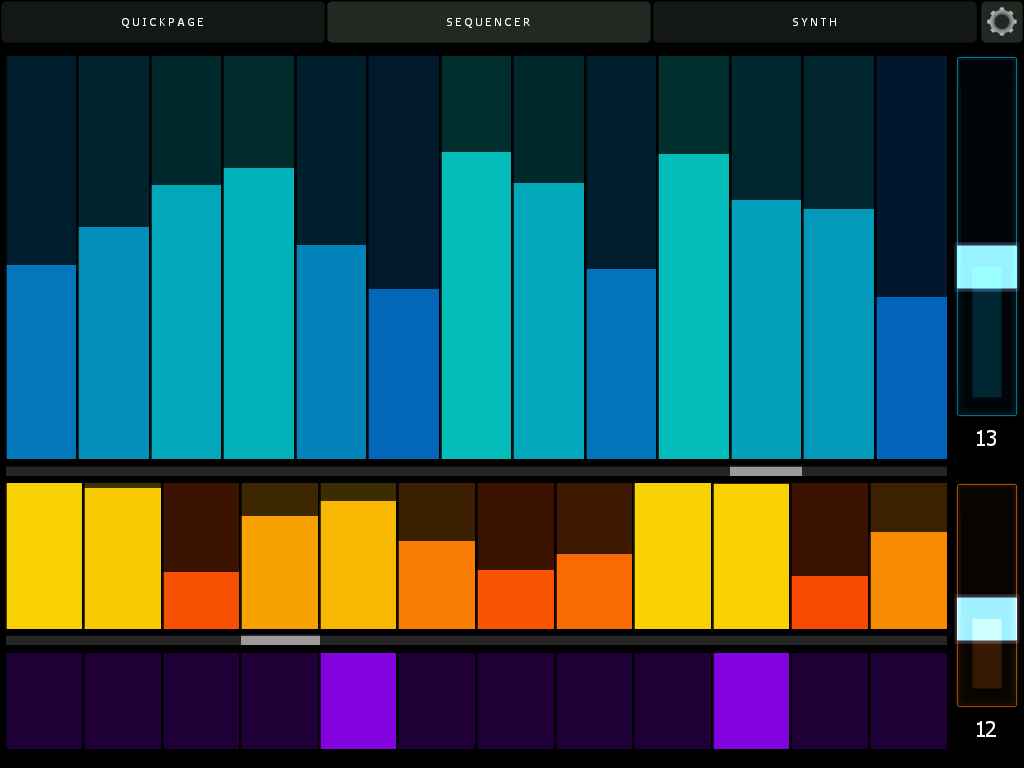
Here’s the sequencer page. Swipe a finger across to set pitch and velocity, or use multiple fingers to adjust many values at once. If you enable bidirectional control, all parameters in Lemur will update on snap change, including sequence lengths and values. Note the cursors – their position will move as Chroma plays, letting you know where you are in the sequence without having to keep your eyes on the computer screen.

Here’s the synth page. All Cgris-Gris parameters are editable and also update when you change snaps in Reaktor. The filter section features a drop down menu to select scale types.


Here’s the updated cheat sheet – new features on the GUI are highlighted in blue.

chromanotes 02

Now, about that bidirectional control – in order to have your Lemur controls update when you change Reaktor snapshots, simply create an OSC target called Lemur, and direct it to port 8000 and whatever the IP address of your iPad is on your local or ad hoc network. Here’s what my config looks like:

Pretty easy, actually. Make sure you use port 8000 for Lemur though – that is its standard port and cannot be changed. (I use port 10001 for Konkreet Performer and TouchOSC)

More info on Chroma and Gris Gris, including video, is here.

Chroma and Gris-Gris: Sequenced Monster Monosynth

Ladies, Gentlemen, Exalted Bipeds, may I introduce to you my latest creation, the Chroma and Gris-Gris ensemble:

Chroma is a performance oriented monosequencer and VA carefully tuned for ergonomic ease of use and glitch free operation in standalone and plugin mode. Slur features in Chroma match up with legato and glide features in the Gris-Gris synth to create a slinky sinuous note articulation.

Sequences can be created and controlled via mouse, MIDI, Konkreet Performer, TouchOSC and Lemur. Since there is now full OSC support in the Reaktor plugin version, you can do everything with Chroma in your preferred DAW that you can do stand-alone. A dream come true!

Now, about those Konkreet Performer mappings:

TouchOSC and Lemur templates are included in the package but there’s something special about Konkreet Performer that sets things on fire when it’s paired with Chroma and Gris Gris, a certain magic in the way it morphs and distorts sound. It is my firmly held opinion that not nearly enough people use KP and if you want something really special and unusual on your iPad you should rush right over to  Konkreet Labs or head straight for the App Store and buy a license.

The Gris-Gris synth is easy to program, surprisingly versatile, screams like a bastard and can be played on its own with MIDI input. Check out the effects bank for some wild quasi-modular sounds. A dedicated filter LFO with a morphing shape control and chaos flux knob provide mutating automation. Flux controls are also provided for the mix and filter feedback sections. Want more sounds? Here ya go:

Chroma’s MIDI output can be used to trigger external synths as well, depending on the completeness of the synth’s MIDI implementation. Tested and fully working synths include NI Massive, NI Absynth, U-he Tyrell and Tal Noisemaker. Some synths may work perfectly for note sequences but not for slur and glide.

Here’s the full cheat sheet:chromanotes

Chroma is 24.99 USD temporarily reduced in price to $19.99 and can be purchased and downloaded immediately. Remember, Chroma is a Reaktor ensemble and requires a full installation of Reaktor 5.8.0, not just Reaktor player.

Buy Chroma and Gris-Gris Now Add to Cart

Poly Theremin, Exclusively for Konkreet Performer

Hey gang, did you notice that the Konkreet Performer half price sale is still in effect? Go get it right now. Even if you don’t have an iPad – you can get that later, it’s a good reason to get one. (edit: sale is long gone but the Performer software is still there and it… is… fantastic!)

As a little bonus for Konkreet users, I’ve reskinned and refreshed my theremin ensemble, with some features from the Chroma sequencer.

Here’s what it sounds like:

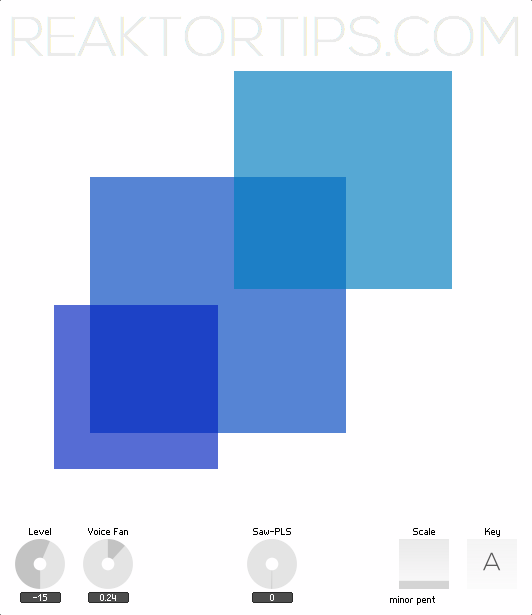
And here’s what it looks like:

Download here

The onscreen display is just a display – to make some noise, set up Konkreet Performer with three nodes and a ribbon. The three nodes control its three voices, and the ribbon controls beat-repeat and voice panorama.

It’s a lot of fun to play and if you’re ambitious, the structure within is a good introduction to mapping Konkreet parameters to Reaktor voices: node angle from the central node controls pitch, distance from the central node controls vibrato intensity and resonance, and touching and releasing the nodes gates the voices.

Enjoy!

ParamDrum: fun with TR samples and misc. effects

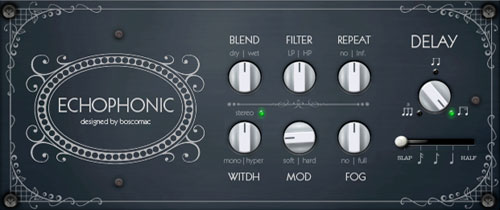
I found a terrific little dubby echo here courtesy of Boscomac and decided to hotwire it into my Paramdrum ensemble.

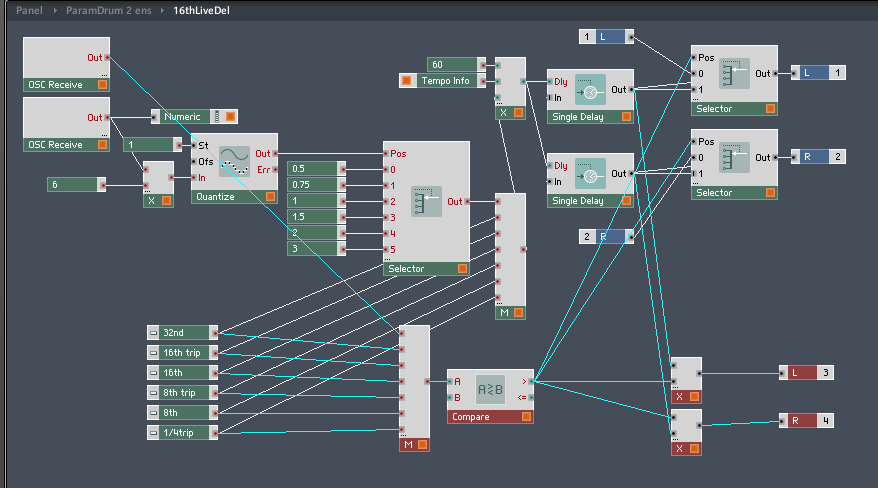
I added a router to the beat delay like so:
Whenever one of the beat repeat buttons is engaged, the “compare” module detects that its output is  greater than zero – this changes the multiplier from zero to one on the extra outputs where the sound is directed to the Echophonic effect. If you have ParamDrum it’s a quick and easy modification. This way, the dry signal doesn’t normally go through the Echophonic and it becomes a haze that drifts around the stuttering when you engage the beat repeat.
This is one of the many reasons I like Reaktor rather than compiled VSTs – you can do little tweaks like this to existing ensembles as the mood strikes you. Here’s how it sounds:


This uses the samples from an earlier edition of Paramdrum, the TR edition, which has a sample map of simpler, cleaner drum hits – analogue sounding but with a morphing twist. You can download the TR edition samples for free here. Of course, I think they sound best in Paramdrum. 🙂

Like what you’re hearing? Buy Paramdrum here. (You need a full working installation of Reaktor 5 to use this instrument, not just Reaktor player)

(Download Boscomac’s Echophonic effect free here – he has lots of other very cool goodies too)