Yearly Archives: 2013

Roundup: Automated Faders and Gestural Instruments in Reaktor

Last weekend Andre Goc uploaded Weirdo to the Reaktor user library. It’s a granular sampler with automated faders controlling many of the parameters. Very cool!
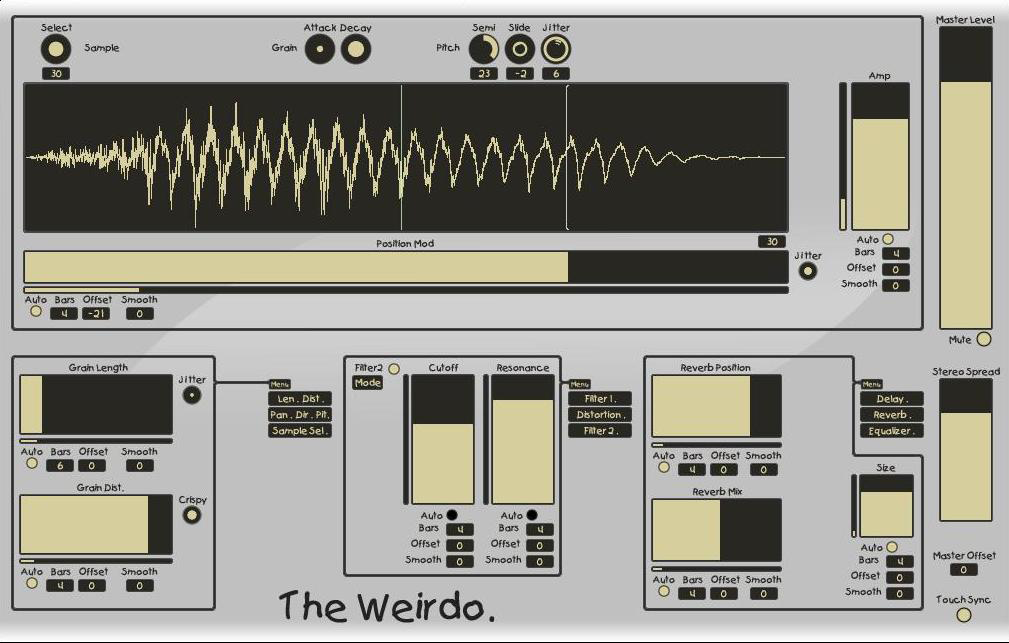
The idea of automated faders has a long and interesting history in Reaktor.


One of the first times I saw this implemented was in the venerable Green Matrix ensemble that debuted in Reaktor 4:

This intrigued me but at the time I couldn’t figure out how to chop out the faders intact and use them in my own creations – I was too much the noob.

The next automated fader that came onto my radar completely blew my mind – Metaphysical Function, which was originally sold separately in the Electronic Instruments 2 package, and later incorporated as part of the Reaktor 5 factory library.

I can’t emphasize enough how Metaphysical Function shook me up and turned my mind around about music making methods and even about music itself. Anyhow, again the faders were a bit unwieldy, and though I did manage to extract the macros and get them working in my own ensembles, I eventually abandoned that and built my own from scratch.

My own recordable faders first made their Reaktor Library debut in Dubby Red Planet, which was a remix of a classic Dieter Zobel instrument, and later on their own as The Freshmaker, a tool / macro upload for Reaktor builders.

I later adapted the Freshmaker faders for use in my ParamDrum drum machine. ParamDrum is set up with its recordable faders mapped to Konkreet Performer node parameters, taking it into a whole new dimension of gestural control. While we’re on the topic of iOS, I should also mention one of the more awesome iOS gestural instruments – Figure. Gestural control is one of the most powerful aspects of tablet music making and it’s always baffled me that devs will release sonically revolutionary and intriguing instruments that slavishly stick to a keyboard style control. Props to the Propellerheads for moving beyond that.

The great Kristian Thom, creator of Acoustring, took some inspiration from The Freshmaker and built his own superb toolkit of automated controls which you can download here. And Andre Goc, creator of Weirdo, built his own modified auto-faders based on Mr. Thom’s devices.

So that’s one path through the history of automated faders in the Reaktor user library – doubtless there are things I’ve skipped over – if you know a good upload I’ve overlooked, please mention it in the comments. Perhaps you’d like to download one of the macro sets or fader based instruments and start hacking away at controlling your own synth, effect or sampler parameters. Go for it!

Update: I knew I was overlooking things!

Reichatron by Matt Mower is another spiritual descendant of Metaphysical Function, inspired by the phase-shifting music of Steve Reich. Matt also uploaded his faders separately here.

ConiX by Dmitriy Vasiliev is a package of automated faders aimed at Reaktor builders.

Ghost Shift 1.1 with Konkreet Performer mappings

When I released Ghost Shift I didn’t have live control in mind other than mapping a MIDI fader to the mix control. However, the recent update of Konkreet Performer got me thinking, and I realized there was an easy way to map Performer parameters to the individual delay taps in Ghost Shift. Here’s how that turned out:

Here’s how it works: you set your number of delay taps – I find three works well – in the Ghost Shift instrument properties. The node visualizer instrument is voice-slaved to Ghost Shift so its number of nodes / voices should auto adjust. If it doesn’t, turn Reaktor’s audio engine off and on again.

Make sure Reaktor is set up to receive OSC from Konkreet Performer on your iPad. Here are the setting screens inside Performer, showing which parameters and settings I’ve used:

Notice that every node parameter is active, from angle and length to X and Y. We’re going whole hawg here, using every part but the oink. Also activate the ribbon, which controls the mix of dry and wet signal.

So how does one obtain this marvelous and endlessly entertaining Ghost Shift device? Click here:

Add to Cart

It’s free! Enjoy!

Floodverb for Reaktor

Boscomac has released Floodverb for Reaktor, a lovely sounding reverb with a control that lets you shift it from static into infinite reverberation on the fly, plus a ducking mode that brings up the reverb when you stop playing.

FLOODVERB is a special reverb that inundates your sound and plunges it into the depths of the spread. Conventionally, you can choose the level of reverb, the rate of diffusion of the reverb sound and even the color of its spread by using the band-stop filters.

But the original aspect of Floodverb lies in its three modes of actions:

  • Fixed: you set the length of the reverb.
  • Controlled: you choose by a midi controller that the reverb becomes inifinite.
  • Ducked: when you do not play, the reverb becomes infinite and suspends your last notes.

Three interesting ways that make Floodverb is a unique effect. Let yourself go snorkeling in the background of sound ocean and maybe after a few hours of music, you will see some dolphins …

Get it here. As usual, it’s free, but users who appreciate Boscomac’s wonderful ensembles are encouraged to leave a donation.

Konkreet Performer update!

A new version of Konkreet Performer appeared over the weekend with a couple of great improvements. Number one, there’s now a way to resize the touch areas – a larger touch area around each node makes aiming easier, which is great especially in the frenzied spurts of creativity this control surface inspires.

Secondly, there’s now a setting to make the angle parameter “discontinuous”. Previously, the angle of a node from the center increased from left to right whether the node was above or below the center node. That way, the value would never jump from one to zero but always smoothly increase to one and back to zero as you orbited the node around the center.

That’s great in one way, if you don’t want that jump, but it doesn’t allow the angle from centre parameter to distinguish between values above and values below the centre node. With discontinuity activated, every angle in the 360 degree circle is unique; the values above range from zero to 0.5 and the values below, as you continue clockwise, go from 0.5 to 1 and right at the end they jump from 1 back to zero.

This is going to be terrific for my Chroma and Mirage instruments, which send their values back to Konkreet Performer on snap change, to place the Performer nodes according to the settings of the current snapshot; now, I can guarantee that the placement on snap change will be the same every time.

Discontinuity will also allow for much higher resolution control of the angle parameter, as you wind around it to change a value in your Reaktor ensembles or other destinations. I’ll post some examples for you later this week.

(incidentally, there will be free updates of Chroma and Mirage this fall!)

Update: looks like there’s a bug with node angle when Konkreet receives OSC. This won’t be a problem for most users, who are only sending from Konkreet to their musical devices and not receiving values in Konkreet to update the node positions. The Konkreet devs are aware of the problem and a fix is coming.

@peterdines Your article just triggered the dawning realisation that we forgot to test OSC In with node angle discontinuous! Damn!
— KonkreetLabs (@konkreetlabs) August 12, 2013

@peterdines guess there’ll be a v2.1.1 fix for OSC In soon… šŸ˜‰ #KnewIForgotSomething
— KonkreetLabs (@konkreetlabs) August 12, 2013

UPDATE: and now, the update is updated with a fix for OSC receive in discontinuous angle mode! I was testing this and experimenting with it last night. The cool thing is, now you can calculate polar to rectangular coordinates using discontinuous mode, because every node position is unique – which not only makes it better for recalling node position from Reaktor snaps, but for visualizing node position on the screen. I’m in the process of updating the Konkreet translator / visualizer accordingly.

REAKTOR’s Scenario and ā€œOperation Limitationā€

In this video, Brent Kallmer discusses the benefits of limiting your options by using the classic Reaktor ensemble Scenario. I can relate to this, as can anyone with a well stocked plugin folder, especially us Reaktor users – it’s easy to get trapped in what the writer Douglas Coupland called options paralysis.

Brent offers some further thoughts on his blog at Bluewater VST.