Yearly Archives: 2013

Music Production Tutorials Explores Frame 3

Danny J. Lewis of Music Production Tutorials tried out my free Frame 3 ensemble and liked it so much he made a brief video demonstrating what happens when you explore parameter changes in one of the default snapshots.


What’s interesting here is how deep he goes into the sound… Frame was designed for just this sort of exploration, for deep dives into detailed samples to bring out hidden goodies and details.

More on Frame 3 including download link and tutorial series 

Frame’s big brother Loupe is here

Maschine & Reaktor Tutorial – 70s Solina Strings Ensemble

In this video, Danny from Music Production Tutorials introduces the free Solina-V String Ensemble (available here in the Reaktor user library) and demonstrates its use in Maschine.

The Solina was a classic 70s synth used by many of the soul/funk/jazz artists of the time. It’s got a lovely spacey, trippy sound when you make use of some of the controls.

Hugo Portillo’s reconstruction of the Solina in Reaktor is jaw droppingly good, and rivals other top-drawer emulations like the DCAM Synth Squad Amber, in my opinion. If you want to trip out 70s style, get downloading and start playing!

Ambient Loop Generation in REAKTOR

Brent Kallmer comes through again with a fantastic video and tutorial post on combining two Reaktor factory library instruments into a sum that is greater than its parts:

REAKTOR‘s Sound Generators (think Metaphysical Function, Skrewell, and Space Drone) produce complex, evolving walls of sound that need no accompaniment. But perhaps you’ve wondered—given Sound Generators’ inclination to do their own thing—how you would use this strange sonic magic in one of your own, rhythmically minded productions. The answer is offered by our good friend Fast FX. By teaming up Fast FX with one of REAKTOR’s Sound Generators (this time it’s Metaphysical Function), we can create an ambient loop generation machine the likes of which the world has never seen…

Brent is a machine… he just moved house last week and already he’s delivering quality material like this. When you’re done checking this out, explore the rest of Brent’s site which is chock full of valuableReaktor information.

MPT Deep House Synth for Reaktor

Here’s the (almost) free Deep House Synth for Reaktor, from Danny J. Lewis of Music Production Tutorials.

You can get the Deep House Synth almost for free, or rather, for a tweet or a facebook post, which is an interesting use of networking – it makes the phrase “social capital” rather literal.

In this second video, Danny discusses the internal structure of the synth:

Update: if you’re feeling nervous about giving Pay With A Tweet write access to your Twitter or FB timeline, you can always edit your FB or Twitter app settings afterwards to revoke access to your account from this app. Your FB app settings are here. Twitter app settings are here. If you’ve never visited those settings pages before, you might be surprised at what already has write access to your timelines.

Sending Random Notes from Reaktor

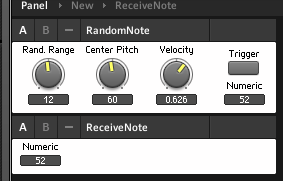
Here’s a quick structure and mini tutorial that demonstrates how to send a random note from Reaktor on triggered input – you can use OSC or MIDI to map a control to the trigger button here:

…and the RandomNote will then send a note to the ReceiveNote instrument – or, in the properties, you can set up RandomNote to send the note to a different instrument, or a different plugin, or even a hardware synth. Use the Connect tab of the RandomNote instrument properties to select a destination.

The center pitch and rand. range knobs control the range of notes that can be selected randomly.  The velocity knob sets the volume of the triggered note. This is not a finished instrument, but a demonstration of a technique. A recipe ingredient, if you will.

Here’s what it looks like inside:

The Trigger button triggers a core cell that outputs a random value between -1 and 1. This is multiplied by the Rand Range knob to produce a value, in this case between -12 and 12. A quantize module turns this into an integer, a whole number, which will correspond to a MIDI note. This value is then added (or subtracted if it’s negative) to the value from the Center Pitch knob. An Order module sends the note value first to the P(itch) input port on a Note module, and then to the Trig(ger) input on a Value module that holds the Velocity, or volume, of the triggered note. The Note module only sends when it receives a value at its G(ate) port, and it sends a note with whatever pitch was at its P input at the time.

Download the ensemble here and start hacking away at it. Replace the Rand. Range and Center Pitch controls with a scaled LFO, and the Trigger button with a clock, for example. Another recipe ingredient that might come in handy here is my Roux basic sequencer macro.

You’ll quickly notice, in sending this control signal to a synth, that it’s missing a note-off. We’ll add that next time!