Category Archives: Ensemble

Poly Theremin, Exclusively for Konkreet Performer

Hey gang, did you notice that the Konkreet Performer half price sale is still in effect? Go get it right now. Even if you don’t have an iPad – you can get that later, it’s a good reason to get one. (edit: sale is long gone but the Performer software is still there and it… is… fantastic!)

As a little bonus for Konkreet users, I’ve reskinned and refreshed my theremin ensemble, with some features from the Chroma sequencer.

Here’s what it sounds like:

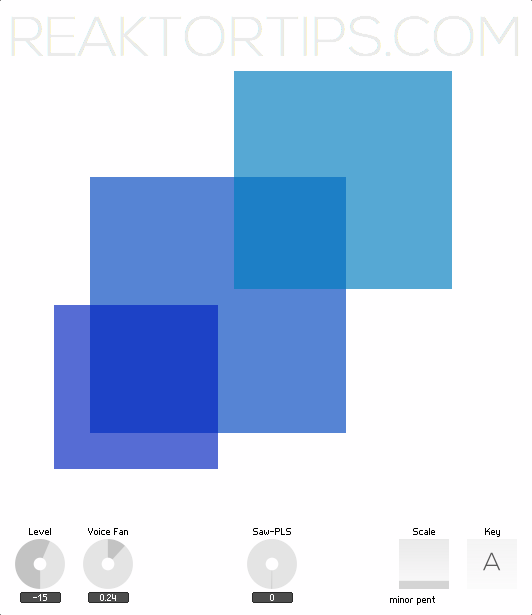
And here’s what it looks like:

Download here

The onscreen display is just a display – to make some noise, set up Konkreet Performer with three nodes and a ribbon. The three nodes control its three voices, and the ribbon controls beat-repeat and voice panorama.

It’s a lot of fun to play and if you’re ambitious, the structure within is a good introduction to mapping Konkreet parameters to Reaktor voices: node angle from the central node controls pitch, distance from the central node controls vibrato intensity and resonance, and touching and releasing the nodes gates the voices.

Enjoy!

ParamDrum: fun with TR samples and misc. effects

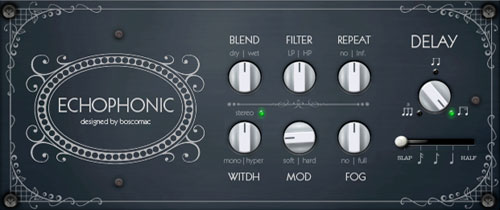
I found a terrific little dubby echo here courtesy of Boscomac and decided to hotwire it into my Paramdrum ensemble.

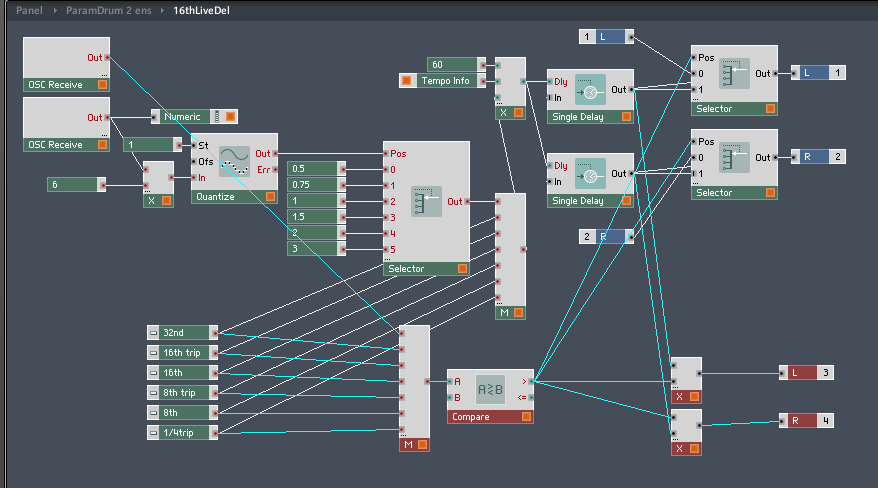
I added a router to the beat delay like so:
Whenever one of the beat repeat buttons is engaged, the “compare” module detects that its output is  greater than zero – this changes the multiplier from zero to one on the extra outputs where the sound is directed to the Echophonic effect. If you have ParamDrum it’s a quick and easy modification. This way, the dry signal doesn’t normally go through the Echophonic and it becomes a haze that drifts around the stuttering when you engage the beat repeat.
This is one of the many reasons I like Reaktor rather than compiled VSTs – you can do little tweaks like this to existing ensembles as the mood strikes you. Here’s how it sounds:


This uses the samples from an earlier edition of Paramdrum, the TR edition, which has a sample map of simpler, cleaner drum hits – analogue sounding but with a morphing twist. You can download the TR edition samples for free here. Of course, I think they sound best in Paramdrum. 🙂

Like what you’re hearing? Buy Paramdrum here. (You need a full working installation of Reaktor 5 to use this instrument, not just Reaktor player)

(Download Boscomac’s Echophonic effect free here – he has lots of other very cool goodies too)

Mirage 1.9.6.1

Here is the new version of Mirage featuring OSC control mappings for the awesome Konkreet Performer iPad control surface.

Note: Mirage works just fine on its own without KP too, just map some MIDI controllers or use a mouse. A TouchOSC template will follow

Update: Download link now goes to version 1.9.6.1 which is the same as 1.9.6 except the Mirage instrument header is set to visible, making it easier to get into instrument properties and change the number of voices. It arguably looks “neater” with the header bar hidden but isn’t as noob-friendly.

This version is free for owners of previous versions. Download here – your existing password will open the archive.
The new version includes extensive feature enhancements and numerous bug fixes, and carefully thought out, tested and integrated Konkreet Performer mappings. Mirage snapshot recall will also recall node positions and transmit them to Performer on your iPad.
mirage 196 diagram
This time out the sample material is mostly one-shots to work in conjunction with the added pitch correction. Adding longer phrases and snippets of songs works well too but with the one-shots you can do something more deliberate and compose a part for a pre-existing track. I find with long phrases there are only a couple of note combinations that work well and what you come up with will have a mind of its own and suggest its own composition.There are a couple of trashed piano field recordings in here that rattle beautifully – nothing like hitting the harp directly on a piano that’s sat out in the weather for a few seasons.

To use Konkreet Performer with Mirage, set up a 4 node layout with visible node labels, activate trigger hold, and set inertia to 30. When touching and moving the central node, the other nodes will slowly track and follow, creating a sort of manual LFO that slowly snaps back to the snapshot’s original settings.
The Mirage package includes a separate translator ensemble that can be run in Reaktor standalone, parallel to a host using Mirage as a plugin, to translate Konkreet Performer’s native OSC signals to MIDI. Use MIDI Yoke on Windows or the IAC driver on Mac to reroute MIDI from the translator to your host.
Mirage is $15 and a license can be purchased here:Mirage Add to Cart

Or, save $$ and buy the sampler pack which includes Loupe and ParamDrum.

Any questions? Ask away!

Loupe 1.5.4 fix for Reaktor 5.6

From now on, buying Loupe on this page also gets you a copy of Loupe 2!

It came to my attention – frustratingly, as I was attempting to write some music – that the Reaktor 5.6 update had done something that messed up the slice points in Loupe. After changing a snap, slices would play on too long, drop out or play the wrong part of the wave when they were first triggered. Subsequent key presses on the same note worked fine.

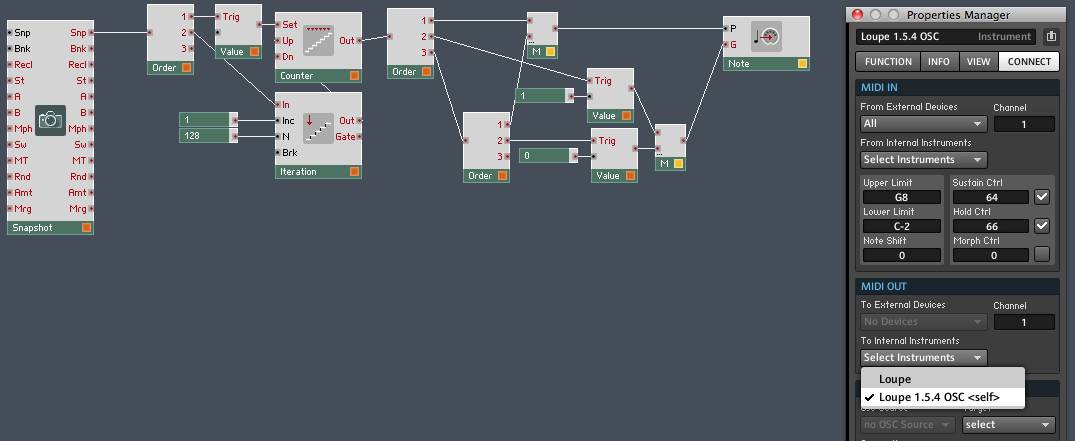
I spent hours trying to fix it the proper way, by looking for initialization problems. Finally I decided to brute force the issue with an iteration macro:

All this does is silently bang out 128 notes in a split second when the instrument loads or changes snaps. As you see in the instrument properties manager, MIDI output is directed back at itself, making Loupe properly initialize every slice. This is perhaps inelegant, the equivalent of kicking 128 televisions, but it works well, doesn’t cause other problems, and I’ll take a working kludge over broken ideological purity any day.

If you have an instance of Loupe already loaded with your snapshots and samples, and you don’t want to bother with the update, you can simply install this macro in the main instrument structure, and make sure to go to the connect tab in the instrument properties and redicrect its MIDI output to itself. Incidentally, tracing the events in this macro makes for a pretty good exploration of intermediate to advanced Reaktor event wrangling and I welcome any questions – post ’em below.

Download the update here. Don’t have a Loupe license? Learn more and purchase here.

Shout out to Felix Petrescu (Makunouchi Bento) and Phil Durrant (Trio Sowari) for beta testing!

ParamDrum for Konkreet Performer

Please note: though this version of ParamDrum has Konkreet Performer mappings, Konkreet Performer is not mandatory. ParamDrum works just fine with a mouse or any MIDI controller.

Hey kids! It’s time for yet another update of ParamDrum.

This time the big deal is Konkreet Performer mappings. Performer is an iPad app that gives you tactile control over anything that can receive OSC, such as Reaktor. Free utiities also let you translate it to MIDI for software and hardware that can’t receive OSC. How good is Konkreet Performer? It’s the reason I went out and bought an iPad in the first place.

Here’s a cheat sheet with the lowdown on who does what where and when in the KP interface:

ParamDrum 3 kp

For those of you who don’t have KP (go get it you fools), the new version still includes a new sample set, a whole lot of new snaps, and new features including optimized randomization.

Screen shot 2011-07-13 at 6.49.38 PM

A funny thing about the beats this thing throws down in conjunction with Konkreet – it’s so easy to make crazy fun beats that you’ll be making and saving one after another at a furious clip. That’s why this edition of ParamDrum has so many more snaps compared to earlier versions. And among the most warped of them, you will find that they only make sense early in the morning when your ears and mind are fresh. When your ears, body and mind are exhausted, late at night, you will lose the ability to follow the sickest beats. So never delete snaps late at night. True story.

ParamDrum KP is free for owners of previous versions. Did I mention that you also need a working installation of Reaktor to use it? I should mention that. You can download ParamDrum KP edition here. Don’t have ParamDrum yet but want in on the game? Buy a license here:

Add to Cart

Update: Due to changes in default settings for the latest versions of Konkreet Performer, not all parameters are automatically mapped. Quickest way to fix that is to install this bank in Konkreet Performer via iTunes. Instructions on working with Konkreet banks can be found here.